Showing posts with label SEO Tutorial. Show all posts

Friday, 9 August 2013

30 Recommended SEO Settings for Blogger


Recommended SEO settings for Blogger
Learning SEO is important for every webmaster and blogger. Why? Because no matter how great the content on your site is, you're not getting any of it into search results if you don't apply SEO tactics. SEO makes your content visible to the outside world. Therefore, for your content to actually bring in any traffic, you need SEO. We have previously shared various posts onsearch engine optimization, but today, I'd like to share some SEO settings that every blogger should apply on their blog. These are specific to Blogger, but that doesn't mean you can't apply some of them to other platforms.


Before writing a post

1. Choose your topic carefully

Choosing the post topic is the most important part of creating content. The topic you choose should be compliant with what your users want. It should be unique and original, and should offer something of value to the users. Then, as you're constructing your post, you should ask yourself some questions regarding the topic and content (see Number 20 below).

2. Check out competition


Always check to see what your competitors are doing; what topics they're posting about, what strategies they're using, and most importantly, what's hot on their websites. I'm not saying that you go ahead and copy them. But take a general hint before coming up with your own content ideas.

3. Check out latest trends


Make sure you follow the latest trends and news on various social media networks. Write about what's hot. Writing on the most recent trends not only brings in a lot of readers, it also tells search engines that your website is dynamic, and provides fresh and latest content to its users.

4. Keyword research before post!

So, you've decided to write about something. But you're looking for words to explain? You have to learn how to do some keyword research first. You will need keywords for various different things, such as titles, meta descriptions, tags, and so on. Check out this article on doing keyword research to find out more about it.

5. The difference between a writer and a blogger

A good blogger might be a good writer, but the vice-versa isn't always true. A good writer might know how to write for readers, but a blogger also knows how to write for search engines. To be a good blogger, you need to adopt a technical style of writing, keep a consistent approach, and a lot more. Check out this post on creating great content that applies to readers as well as search engines.

6. Recommended word limit

There's no such thing as an 'ideal word limit' for a blog post. It purely depends on the number of posts you publish, and the post topic. But SEO experts agree on a minimum of 300 words to avoid penalties. We would recommend a range of 500-700 words on average, since that seems to be the magic number when it comes to readers - neither too short so as to miss out on important things, nor too long for it to get boring.
  • The ideal word limit for a blog post
While writing a post

7. The title is the king!

The title is the most important part of a blog post, since it is the one that actually brings in the clicks. Optimizing post titles is a part of being a good blogger. Check out this post to learn all about creating search engine friendly post titles.

8. Optimize Permalink

Always keep permalinks short. Use custom permalinks of around 4-5 words at max, and separate each word a hyphen "-". Make sure you capture your most important keyword in the permalink (your focus keyword).

9. Intro with keywords

Keep all the keywords you can up with at the start in mind, and use them all in your introductory paragraph. It doesn't matter how many keywords you use in the content. But you must use them all at least once in the intro paragraph.

10. Headings and subheadings

Always use a combination of different headings. Usually, blog titles are H1s, so never use H1s. Post titles are usually H2s, so don't use H2s either. Use them only rarely. For the most part, use a combination of H3s and H4s in your post to specify a clear hierarchy in your content.

11. Typography

Typography refers to the styling of your content. It is almost as important as the content itself. Try to use different colored headings; use italic and bold text to emphasise your keywords, Also, once you're done writing your content, select all by pressing Ctrl + A, and then justify its alignment, so that the text looks neat at both ends.

12. Meta descriptions

The Meta description is the second-most important part of your post (after post title), as it is what users will see on a search engine (along with your title). Write a very short description of at most 170-180 characters, and make sure to include all the important keywords in it which you came up with before writing the actual post.
  • Why Meta Descriptions appear in all search results
  • Meta tag generator for Blogger
Linking

13. Inter link

Every post on your blog must have an internal link to another relevant post. This is one of the many ways to improve our rank. Try to at create at least two internal links within your intro paragraph, and at least one or two more in the rest of content. For a detailed guide, read the following post.
  • How to smartly interlink your posts

14. Be careful with Anchor texts

An anchor text is the text you use to link to another page, and it is what users click to get to that other page. Choosing anchor text is a very important part of linking. Never use a single word anchor text. Always use a phrase. Usually, a three-word phrase is the best option. Always use a keyword phrase as anchor text.

Also, keep in mind to never use the same anchor text twice for the same link. It is considered as keyword stuffing, and/or spamming. Whether on your site or another, always vary the anchor text.

15. Nofollow vs dofollow links

A nofollow attribute in a link tells a search crawler not to 'follow' a link. First of all, when linking to external pages, always link to a page that has a better rank than yours. But if you must link to a lower quality page, always us the rel="nofollow" attribute with the link tag. But never do this for reputable sites, like Google, Wikipedia etc, nor for linking to your own pages.
  • When to add a nofollow tag?
  • When should you tag external links as nofollow
  • more articles on the nofollow tag.....
Visuals

16. Use visual content to enhance your posts

Images, videos, infographics, animations; such things spice up your content. If you have a video related to your content, that's great. Otherwise, try to include at least one image in you blog post. And depending upon the topic, you can add many. But make sure you don't add too many, so much so that the textual content gets snuffed out.

17. Naming files and images

Before uploading a video, audio, or image file, always make sure you rename it. Use meaningful keywords, and separate them with dashes. This way, users and search engines can tell what the file is about just by its file path!

18. Optimize images before uploading

Suppose you want to display an image that is 500 pixels wide and 300 pixels high. There's no point in uploading a 1200x720 image. It'll take up space on your server, and rendering time at the user's end. Do everybody a favour, and scale down your images before uploading them.

19. Image Title and Alt text

Always tag images with Titles and Alt text. And always use relevant keywords. We've compiled some posts for you regarding image optimization. Make sure you check them out!
  • How ti tag images to drive traffic
  • How to optimize images
After writing a post

20. Basic questions to ask about your content

So you've created really awesome content. Great! But before it is internet-worthy, you need to ask yourself a few questions about. If the answer to any of the questions below is no, then there's something wrong with the content!
  • Does the content make sense?
  • Have I used good grimmer and punctuation and made little spelling mistakes?
  • Is the content useful?
  • It is unique/original?
  • It it worth sharing and linking?
  • Is it appropriately detailed?
  • Does it have visual content, such as images or videos?
  • Does it have examples, references, unique ideas?
  • Is it interactive enough with the readers?
  • Are there enough calls to action to invoke engagement?
  • Does it ask readers questions about their own experiences?

21. Blog labels

Organize your blog's structure into a series of Labels (or tags and categories if you're using WordPress). Use at least one, and at max three labels for one blog post. And keep the total number of labels between 15 and 20 (for Blogger blogs, but same for categories in WordPress).

  • What are blog labels?

22. Synchronize posts with the traffic

Don't publish your blog 
posts as you complete them. Always schedule them for an appropriate time. For example, monitor your traffic stats and see what time do you get the most amount of traffic. You might want to schedule your posts for around that time. But try to be consistent about your timing. Pick a timing that works for you, and stick to it!

23. Posting frequency

There are no restrictions when it comes to posting frequency. But the more, the better. Try to keep up with at least one post a day. You may write as many as you can per day though. There's no limit. You can even write a hundred if you can afford to :)
Other settings

24. Create a sitemap

A sitemap is a listing of all the pages on your site. Often times, search crawlers might miss out on a page because you might not have linked to it in any other page. So to tell search engines to index that isolated page, you have to submit a sitemap to them. You could use a plugin for generating a sitemap, or read our post on Blogger Sitemap Generator for more details.

25. Blog load time

The blog load time is the most important when it comes to user-friendliness. The slower a blog loads, the more users tend to leave it before it's done loading. So always try to keep your load time to a minimum. Here are some tips that should help;
  • 11 Useful Tips to help reduce your blog load time
26. Sitelinks
Sitelinks appear on blogs that have PR 2 or above, and they are a collection of some of the links on your blog that appear in Google search results. They make your blog look more professional. Check out our post on how to tell Google what links to display in sitelinks.

27. Social bookmarking widgets

Add social bookmarking widgets on your blog to improve your social rankings. Search engines like it when they find links to your social profiles. Besides, such widgets make it easier for users to share your content.

28. Directory submissions

Submitting your blog to directories such as DMoz increases the number of backlinks you have, and in turn, your website's rank.
  • Why submit blog posts to the top 10 article directories?
  • Submit your blog to bloggers directories now!

29. Working on your PageRank

PageRank is Google's way of ranking websites. The higher your PR, the better chances you have of getting into search results, and the faster your index rate will be. Read the following post to learn a lot more about PageRank, and how to improve it.
  • Reasons why your PageRank is not improving

30. Avoiding SEO penalties

In the end, avoid using shady SEO tactics to jump your rank. Always use Search engine friendly techniques to avoid algorithmic penalties. Check out the following posts for more info.
  • Recovering from Google Penguin update Penalty
  • 10 Link Building techniques Google Penguin won't mind
Got any questions? Or maybe, have something to add? Please leave a comment below and tell us what you're thinking. Cheers :)

Sunday, 4 August 2013

20 SEO Terms You Should Know


seo-termsIf you have a website or blog, or if you work with anything related to the Internet, you’ll certainly need to know a bit about search engine optimization (SEO). A good way to get started is to familiarize yourself with the most common terms of the trade, and below you’ll find 20 of them. (For those who already know SEO, consider this post as a refresher!).

1. SEM: Stands for Search Engine Marketing, and as the name implies it involves marketing services or products via search engines. SEM is divided into two main pillars: SEO and PPC. SEO stands for Search Engine Optimization, and it is the practice of optimizing websites to make their pages appear in the organic search results. PPC stands for Pay-Per-Click, and it is the practice of purchasing clicks from search engines. The clicks come from sponsored listings in the search results.

2. Backlink: Also called inlink or simply link, it is an hyperlink on another website pointing back to your own website. Backlinks are important for SEO because they affect directly the PageRank of any web page, influencing its search rankings.

3. PageRank: PageRank is an algorithm that Google uses to estimate the relative important of pages around the web. The basic idea behind the algorithm is the fact that a link from page A to page B can be seen as a vote of trust from page A to page B. The higher the number of links (weighted to their value) to a page, therefore, the higher the probability that such page is important.

4. Linkbait: A linkbait is a piece of web content published on a website or blog with the goal of attracting as many backlinks as possible (in order to improve one’s search rankings). Usually it’s a written piece, but it can also be a video, a picture, a quiz or anything else. A classic example of linkbait are the “Top 10″ lists that tend to become popular on social bookmarking sites.

5. Link farm. A link farm is a group of websites where every website links to every other website, with the purpose of artificially increasing the PageRank of all the sites in the farm. This practice was effective in the early days of search engines, but today they are seeing as a spamming technique (and thus can get you penalized).

6. Anchor text: The anchor text of a backlink is the text that is clickable on the web page. Having keyword rich anchor texts help with SEO because Google will associate these keywords with the content of your website. If you have a weight loss blog, for instance, it would help your search rankings if some of your backlinks had “weight loss” as their anchor texts.

7. NoFollow: The nofollow is a link attribute used by website owners to signal to Google that they don’t endorse the website they are linking to. This can happen either when the link is created by the users themselves (e.g., blog comments), or when the link was paid for (e.g., sponsors and advertisers). When Google sees the nofollow attribute it will basically not count that link for the PageRank and search algorithms.

8. Link Sculpting: By using the nofollow attribute strategically webmasters were able to channel the flow of PageRank within their websites, thus increasing the search rankings of desired pages. This practice is no longer effective as Google recently change how it handles the nofollow attribute.

9. Title Tag: The title tag is literally the title of a web page, and it’s one of the most important factors inside Google’s search algorithm. Ideally your title tag should be unique and contain the main keywords of your page. You can see the title tag of any web page on top of the browser while navigating it.

10. Meta Tags: Like the title tag, meta tags are used to give search engines more information regarding the content of your pages. The meta tags are placed inside the HEAD section of your HTML code, and thus are not visible to human visitors.

11. Search Algorithm: Google’s search algorithm is used to find the most relevant web pages for any search query. The algorithm considers over 200 factors (according to Google itself), including the PageRank value,
the title tag, the meta tags, the content of the website, the age of the domain and so on.

12. SERP: Stands for Search Engine Results Page. It’s basically the page you’ll get when you search for a specific keyword on Google or on other search engines. The amount of search traffic your website will receive depends on the rankings it will have inside the SERPs.

13. Sandbox: Google basically has a separate index, the sandbox, where it places all newly discovered websites. When websites are on the sandbox, they won’t appear in the search results for normal search queries. Once Google verifies that the website is legitimate, it will move it out of the sandbox and into the main index.

14. Keyword Density: To find the keyword density of any particular page you just need to divide the number of times that keyword is used by the total number of words in the page. Keyword density used to be an important SEO factor, as the early algorithms placed a heavy emphasis on it. This is not the case anymore.

15. Keyword Stuffing: Since keyword density was an important factor on the early search algorithms, webmasters started to game the system by artificially inflating the keyword density inside their websites. This is called keyword stuffing. These days this practice won’t help you, and it can also get you penalized.

16. Cloaking. This technique involves making the same web page show different content to search engines and to human visitors. The purpose is to get the page ranked for specific keywords, and then use the incoming traffic to promote unrelated products or services. This practice is considering spamming and can get you penalized (if not banned) on most search engines.

17. Web Crawler: Also called search bot or spider, it’s a computer program that browses the web on behalf of search engines, trying to discover new links and new pages. This is the first step on the indexation process.

18. Duplicate Content: Duplicate content generally refers to substantive blocks of content within or across domains that either completely match other content or are appreciably similar. You should avoid having duplicate content on your website because it can get you penalized.

19. Canonical URL: Canonicalization is a process for converting data that has more than one possible representation into a “standard” canonical representation. A canonical URL, therefore, is the standard URL for accessing a specific page within your website. For instance, the canonical version of your domain might be http://www.domain.com instead of http://domain.com.

20. Robots.txt: This is nothing more than a file, placed in the root of the domain, that is used to inform search bots about the structure of the website. For instance, via the robots.txt file it’s possible to block specific search robots and to restrict the access to specific folders of section inside the website.

Friday, 2 August 2013

How To Get Traffic To A New Blog ?


How To Get Traffic To A New Blog ?Most of the newbie bloggers quit their blogging just because they don’t see any traffic from their blog(s). Even who have started their blogging career long time ago don’t see much improvisation in their traffic.
Why?

Because they don’t follow few tips which has to be followed to Get Traffic to A New Blog . ;)

How can any blogger Get Traffic to A New Blog?

Though there are many ways to Get Traffic to A New Blog, the most important factor is NETWORK. The more network you have the more traffic you’ll get.
The best way to build a network around your blog is: start interacting with others using
  • Facebook
  • Twitter
Why I’m mentioning only these two sites because, it’s easy to spread your word and follow other bloggers easily using this social media sites and  Get Traffic to A New Blog.

How to Get Traffic to A New Blog ??

Following are some EXCEPTIONAL ways to bring traffic to a new blog (0r) any blog.

1. Blog Comments:

Comment on top blogs in your niche try to be the first 5 commenters.
Tips: Subscribe to their RSS feeds.
Don’t spam their blogs by writing one liners. Add value to your comments.
If you want to get traffic daily this is the best way to go.
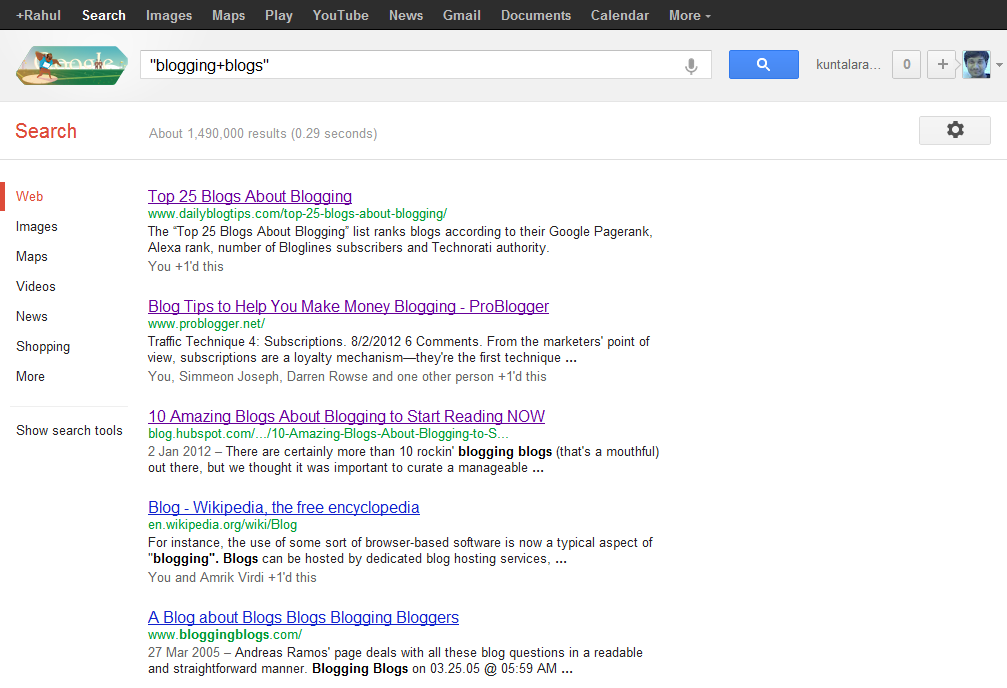
Type “your niche + blog” in google to know which are the top blogs in your niche.How To Get Traffic To A New Blog ?
Ex: “blogging + blog”
Read : Why You should comments on other blogs?

2. Network with others using Facebook and twitter

Facebook: Join in Groups.. Promote yourself out there.. BTW facebook alone is giving me 100+ leads daily (even without promoting everyday!). Ammar Ali is also getting huge traffic from Facebook ;) . So don’t neglect bringing Facebook traffic to your blog.
You may find it difficult in the beginning but when you start promoting others content and when you get to know each other on Facebook, it becomes very easy!
PS: You can join our group ‘Everything About Blogging‘,  and can promote your blog there!
Twitter: Follow top bloggers in your niche and follow their followers. This is the simple yet effective way of increasing your targeted twitter followers. Once you have done this, you can tweet your new articles and ask your followers to retweet it.

3. Video Marketing:

Create a 2 min.video and add your blog link at the starting
Submit them to YouTube, metacafe etc.
Tools to use: Use Screenr to create free videos
Read : Is Video Blogging Worth Trying?

4. Spend time on writing detailed articles.

Never assume that you can bring quality traffic without much efforts.
You need to differentiate yourself with others to become successful. It takes time to create content, I agree but you shouldn’t spend whole time creating only normal or average 600 words posts.
Spend time to create great content.
Write detailed posts with 1000 or 1500+ words once in a while. If you’re not a full time blogger like me, at least try to create detailed posts once or twice a month.
So that you can grab others attention and you can show your blogging expertise to your readers.
It’s really important for you to create killer articles regularly to survive in blogosphere. This can bring your quality traffic from other sites or search engines.

4. Don’t forget SEO

Most people say forget about SEO (Search Engine Optimization) when you’re just starting out.How To Get Traffic To A New Blog ?

I think that’s the dumbest suggestion!

You need to focus on what keywords to use and how much keyword density you should maintain in your content to get search engine traffic to your blog.
It’s extremely important to bring organic (search engine) traffic to your blog. Because it’s free and highly effective!
Make sure that you’re not keyword stuffing your content. It makes your readers hard to digest what you’re saying in your articles.
And do proper keyword analysis before you’re writing the articles. Then embed them into your posts. If you’re a beginner then this is enough! Don’t go beyond, you’ll better understand about SEO when you’re spending more time on blogging.
Don’t Miss : 5 Basic Pillars of Creating Successful and Profitable Blog!

Conclusion:

Always try to retweet and promote your fellow bloggers before asking them to promote your content. This can make others to promote your content sooner or later and you will have high chances of getting their attention if they find it useful. 
I dint recommend guest blogging here in this post. Major reason is without having any online reputation you can’t cope up with other bloggers to get accepted your guest posts. When they reject you, you’ll feel down to submit another guest post to them.
So, focus on building a network by blog commenting, writing great stuff and social media networking using above tips.
Have I missed any other way to  Get Traffic to A New Blog? Take your action by commenting below How To Get Traffic To A New Blog ?

Saturday, 27 July 2013

Submit your Websites to Search Engines for Free


Search Engines

Submit your Websites to Google, Yahoo, Bing Free
Search engines are programs that search documents for specified keywords and returns a list of the  documents where the keywords found. A search engine is really a general class of programs, but the term is often used to specifically describe systems like Google, Bing and Yahoo! Search to help users search for documents on the World Wide Web.

In order for the three SE giants to simply sight or index your websites, you need to submit them first to their information. Below square measure the best way to submit your websites.

Submit your Site to Google

To submit your website to the Google index, all you have got to try to to is go to www.google.com/addurl/. Enter the URL for your home page into the suitable box (including the http://), add any comments you may have concerning your website, so click the Add URL button. That’s it! Google can currently add your website to the Googlebot crawl list, and your website can seem in applicable search results.
For advanced users, visit https://www.google.com/webmasters/tools/.

Submit your Site to Yahoo

Submitting your web site to Yahoo! is an equally easy method. go to http://add.yahoo.com/fast/add?54397758 click `Standard Consideration > Continue . Taking the easy approach, all you have got to try and do is enter your website’s computer address into the Submit an internet site or Webpage box; certify you embody the http:// prefix. once coming into your computer address, click the Submit computer address button, and you’re done.
For Advanced Users, Click "Yahoo! Directory Submit"

Submit your Site to Bing/MSN


Google and Yahoo! are simply two of the large three search engines; you must also submit your website to Bing/MSN. visit http://www.bing.com/toolbox/submit-site-url and enter your entire website URL into the box (including the http://) and so click the Submit URL button. like the Google and Yahoo! submission services, Live Search’s MSNBot crawler are instructed to crawl your website and index all the internal pages linked from your home page.
For advanced users, visit http://www.bing.com/toolbox/webmaster/

Friday, 26 July 2013

How to Setup Custom Robots Header Tags for Better SEO


Custom Robots Header TagsBlogger is continuously improving search preference feature, Add Custom Robots Header Tags are very important for every blogger  for batter SEO. Today tutorial i tell you how to enable custom robots header tags in blogger. You have to be careful to setup custom robots text because if you do something wrong Google not index your page in search engine. Follow the instructions carefully and it'll positively help you to boost your web site traffic.

Step 1: To enable these tags, go to Blogger > Settings > Search Preferences, click Edit next to "Custom robots header tags," and select Yes.

Step 2: Select Yes Option and customize setting shown in the below image.

You must learn about tags when should you use them.
all:  There are no restrictions for indexing or serving. This is default for all pages
noindex:  Do not show this page in search results and do not show a "Cached" link in search results.
nofollow:  Do not follow the links on this page
none:  Equivalent to noindex, nofollow
noarchive:  Do not show a "Cached" link in search results.
nosnippet:  Do not show a snippet in the search results for this page
noodp:  Do not use metadata from the Open Directory project (DMOZ) for titles or snippets shown for this page.
notranslate:  Do not offer translation of this page in other languages in search results.
noimageindex:  Do not index images on this page.
unavailable_after: [RFC-850 date/time]: Do not show this page in search results after the specified date/time. The date/time must be specified in the RFC 850 format. Example: 17 May 2012 15:00:00 PST

Custom Robots Header Tags

Step 3: Now click on ""Save changes" button > Done

That's all! If you have any doubt or need help about it, please leave comment.

SEO Guidelines For New Website/Blogger


SEO Guidelines
Today I am going to tell you some best ways how to improve your blog ranking on Search engine, Alexa-Rank and Google Page Rank. this is basic information about SEO next time we lunch complete course about SEO pack for blog so please subscribe our blog and join our community for learn best things about blogging .

1. How to improve search engine Visibility?

Improving search engine Visibility is that the #1 target of each websites to make it on the highest of each Search Engines results page and it isn't only depending on 1 criteria, rather it is a combination of Back-links  Page-rank  web traffic/impressions, uniqueness, and content quality of a website.

Here are some ways we can increase search engine visibility.
  • Use SEO Optimized Blogger Templates
  • Submit your Websites to Search Engines
  • Submit Website Sitemap To Webmaster Tools
  • Display Author image in Google Search Results
  • Use robots.txt
  • Complete How to Increase Search Engine Visibility?

2. What is Alexa and how to improve it?

Alexa shows your site's current estimated position and rank on the internet. to improve your Alexa, you need to have many Back-links  high Page-rank  and thousands of internet traffic/impressions. Alexa doesn't update in real time and usually takes three months to detect your true rank.

Here are some ways we can increase Alexa page rank.
  • Claim your site on Alexa
  • Install Alexa Widget on your site
  • Write a review about Alexa on your blog
  • Install Alexa Toolbar on your browser
  • Build quality back links
  • Ask users to write a review on Alexa

3. What is Page Rank and how to improve it?

Unlike Alexa, Page-rank only shows your site's current estimated position on the web. to improve it, you need to have a lot of Back-links and articles. Like Alexa, Page-rank does not update in real time.

Here are some ways we can increase Google Page Rank.
  • Write high quality content 
  • Submit Your Site to web and article Directories
  • Use Link Exchange Program to increase back links.
  • Keep updating your site/blog everyday
  • Use Social Bookmarking button to share you site on social sites
  • Website Advertising
  • Commenting On Other Blogs and Websites

How to Enable and Customize Blogger Robots.txt File?


Robots.txt
Hi ! In this tutorial I am going to show you how to edit your Blogger blog robots.txt file. Webmasters use custom robots.txt file to control search engine web robots (also known as Web Wanderers, Crawlers, or Spiders) to crawl some directories and web pages or links of website or blog. when we take settings robots.txt file in blogger then search engine automatically index or remove pages from search engine according to the settings. 

By default each website allows the Search engines robots however if you would like to restricts the robots either to not crawl any bound directory, file or the complete website then you may want the robots.txt file in which you've got to write instructions for search engine bots.

Steps to edit robots.txt on blogger

Your Site Settings › Search preferences › Crawlers and indexing  
Here you will able to see two options Custom robots.txt and Custom robots header tags.These two
 options would offer you the flexibility to customise your robot.txt file.In the last post i told you about
Custom robots header tags.
Now press edit button which is present after  'Custom robots.txt' option. After pressing on edit button
you can see a message " Enable custom robots.txt content? " so press "Yes" and proceed to next step.
Custom robots.txt - Search preferences
Now you can see  text area, type the content which you want to exclude a content from crawling.
Click on Save Changes button.
Enable Custom robots.txt - Search preferences

You are done!
How to block Link from search engines?
No, you have to write the URL. For example, if your want to stop robots from crawling this URL
(www.bloggerknown.blogspot.com/p/about.html) then, in the robot.txt file you will enter this command.
User-agent: *Disallow: p/about.html
Your robots.txt file located under your main blogspot directory as for Blogger Known its located on the following url:
http://www.bloggerknown.blogspot.com/robots.txt
By default blogger robots.txt contains the following content:
User-agent: Mediapartners-Google
Disallow:
User-agent: *
Disallow: /search
Allow: /
Sitemap: http://bloggerknown.blogspot.com/feeds/posts/default?orderby=UPDATED
I know this post is not a new thing but I hope it might help many newbies to understand the importance of robots.txt.


Copyright @ 2013 Blogger Tips & SEO .