Showing posts with label Page Rank. Show all posts

Saturday, 10 August 2013

Top 10 Must Have SEO Tools for Bloggers


new post: prabu
Before we start listing the top ten SEO tools any blogger must use, here are three reasons why you need them:
  • Considering only the latest Panda update Google made, we can expect Search engine optimization to be even more challenging in the future.
  • If you use the right SEO tools for your blog, it’s like you have 10, 30, or even more people working on your side.
  • These tools will save you lots of time and effort when researching keywords and optimizing your website.
As a blogger, you need some intelligent software to help you conquer the daily SEO challenges you are faced with. Much of your success depends on how well you organize and streamline your digital workflow. So be clever about choosing the SEO tools that can make your job easier, more efficient and even enjoyable.SEO - Search Engine gears

Here are the tools:
  • AdWords Keyword Tool

    There’s no need to say that any successful post must begin with a keyword research. And since Google is the world’s most popular search engine, and most of your organic traffic will come from their searches, the best place to start the keyword research would be the Google Keyword Tool. It’s not that this is ‘the king’ among all keyword tools, but it is definitely an important SEO weapon that shouldn’t be underestimated.
  • “The Google Trinity”

    Aside from the Keyword Tool there are other three Google services that are of major importance for SEO, and these include:
    • Google Analytics, for tracking and analyzing the traffic coming to your blog.
    • Webmaster Tools, to get all the latest techniques and advices when it comes to optimizing your blog for Google.
    • Google Trends, to get a head-up to what’s latest on the Web that might apply to your niche.
  • Ubersuggest

    Many SEO experts suggest bloggers to also use the Ubersuggest tool, because it can inspire their creativity and help them think of new keyword combinations and phrases when creating their blog posts, that will really stand out in the search results. Because of this feature the software may be even more powerful than Google’s Keyword Tool within AdWords.
  • Clicky Web Analytics

    Google Analytics is a great platform, but if you need a more flexible solution that will help you get your blog to the next level you should definitely check Clicky Web Analytics. Thanks to the powerful API, for roughly $60 per year, you’ll be able to set you own analytics and monitoring options and get a lot more information out of your daily traffic.
  • WordPress SEO Plugin by Yoast

    WordPress is the CMS most bloggers prefer. If you are one of them, the SEO plugin made for this platform by Yoast is the tool you most definitely should have, since it will help you handle every back-end SEO need to easier fine-tune your blog for peak performance.
  • Xenu’s Link Sleuth

    You can’t allow broken links on your website if you aim to get higher in the search result pages. Xenu’s Link Sleuth is free software that can help you locate the broken links for images, Java applets, HTML files, CSS style sheets and ensure your blog is well optimized when this element is considered.
  • Moz

    If you’ve been blogging for a while now, you won’t be surprised Moz (ex SEOmoz) is in this list. These guys have been here from the very beginning to share their knowledge and experience about SEO and how to best employ it. You’ll have to pay to use their PRO tool featuring Open Site Explorer, FollowerWonk and On-Page Analysis, but it’s going to worth till the last penny.
  • SEO Book Toolbar

    The SEO Book Toolbar is another must have tool bloggers should use when trying to get those high rankings in the SERPs. The toolbar displays essential data on the ranking metrics like page rank, backlinks, unique pageviews, etc.
  • SEO Book Rank Checker

    As a result of the interconnected digital world we live in we are constantly overloaded with all sorts of information and finding exactly what we want becomes more complicated. In such situations, the simple single-purpose tools like SEO Book Rank Checker have proven much more useful. This tool allows you to easily see how your blog ranks for specific keywords and phrases as well as export that data if necessary.
  • Triberr

    SEO is becoming more and more about content with each passing day – content that is quality and interesting, that users enjoy reading, find useful and want to share with others in their network and social circles. Social media today is where all the real magic happens. To create their own interaction networks, and make their posts available to a wider audience of followers and fellow niche bloggers for a more natural distribution of their posts, bloggers are now using the Triberr SEO tool to help them grow their reach.
All these tools are no doubt useful, but they are just web applications to make your job easier. To hit the top of the search result pages you’ll have to mostly rely on your creativity (though there are apps that can help you with inspiration also). Your success in blogging depends mostly on you, but having software you can trust working by your side never hurts.

Friday, 9 August 2013

30 Recommended SEO Settings for Blogger


Recommended SEO settings for Blogger
Learning SEO is important for every webmaster and blogger. Why? Because no matter how great the content on your site is, you're not getting any of it into search results if you don't apply SEO tactics. SEO makes your content visible to the outside world. Therefore, for your content to actually bring in any traffic, you need SEO. We have previously shared various posts onsearch engine optimization, but today, I'd like to share some SEO settings that every blogger should apply on their blog. These are specific to Blogger, but that doesn't mean you can't apply some of them to other platforms.


Before writing a post

1. Choose your topic carefully

Choosing the post topic is the most important part of creating content. The topic you choose should be compliant with what your users want. It should be unique and original, and should offer something of value to the users. Then, as you're constructing your post, you should ask yourself some questions regarding the topic and content (see Number 20 below).

2. Check out competition


Always check to see what your competitors are doing; what topics they're posting about, what strategies they're using, and most importantly, what's hot on their websites. I'm not saying that you go ahead and copy them. But take a general hint before coming up with your own content ideas.

3. Check out latest trends


Make sure you follow the latest trends and news on various social media networks. Write about what's hot. Writing on the most recent trends not only brings in a lot of readers, it also tells search engines that your website is dynamic, and provides fresh and latest content to its users.

4. Keyword research before post!

So, you've decided to write about something. But you're looking for words to explain? You have to learn how to do some keyword research first. You will need keywords for various different things, such as titles, meta descriptions, tags, and so on. Check out this article on doing keyword research to find out more about it.

5. The difference between a writer and a blogger

A good blogger might be a good writer, but the vice-versa isn't always true. A good writer might know how to write for readers, but a blogger also knows how to write for search engines. To be a good blogger, you need to adopt a technical style of writing, keep a consistent approach, and a lot more. Check out this post on creating great content that applies to readers as well as search engines.

6. Recommended word limit

There's no such thing as an 'ideal word limit' for a blog post. It purely depends on the number of posts you publish, and the post topic. But SEO experts agree on a minimum of 300 words to avoid penalties. We would recommend a range of 500-700 words on average, since that seems to be the magic number when it comes to readers - neither too short so as to miss out on important things, nor too long for it to get boring.
  • The ideal word limit for a blog post
While writing a post

7. The title is the king!

The title is the most important part of a blog post, since it is the one that actually brings in the clicks. Optimizing post titles is a part of being a good blogger. Check out this post to learn all about creating search engine friendly post titles.

8. Optimize Permalink

Always keep permalinks short. Use custom permalinks of around 4-5 words at max, and separate each word a hyphen "-". Make sure you capture your most important keyword in the permalink (your focus keyword).

9. Intro with keywords

Keep all the keywords you can up with at the start in mind, and use them all in your introductory paragraph. It doesn't matter how many keywords you use in the content. But you must use them all at least once in the intro paragraph.

10. Headings and subheadings

Always use a combination of different headings. Usually, blog titles are H1s, so never use H1s. Post titles are usually H2s, so don't use H2s either. Use them only rarely. For the most part, use a combination of H3s and H4s in your post to specify a clear hierarchy in your content.

11. Typography

Typography refers to the styling of your content. It is almost as important as the content itself. Try to use different colored headings; use italic and bold text to emphasise your keywords, Also, once you're done writing your content, select all by pressing Ctrl + A, and then justify its alignment, so that the text looks neat at both ends.

12. Meta descriptions

The Meta description is the second-most important part of your post (after post title), as it is what users will see on a search engine (along with your title). Write a very short description of at most 170-180 characters, and make sure to include all the important keywords in it which you came up with before writing the actual post.
  • Why Meta Descriptions appear in all search results
  • Meta tag generator for Blogger
Linking

13. Inter link

Every post on your blog must have an internal link to another relevant post. This is one of the many ways to improve our rank. Try to at create at least two internal links within your intro paragraph, and at least one or two more in the rest of content. For a detailed guide, read the following post.
  • How to smartly interlink your posts

14. Be careful with Anchor texts

An anchor text is the text you use to link to another page, and it is what users click to get to that other page. Choosing anchor text is a very important part of linking. Never use a single word anchor text. Always use a phrase. Usually, a three-word phrase is the best option. Always use a keyword phrase as anchor text.

Also, keep in mind to never use the same anchor text twice for the same link. It is considered as keyword stuffing, and/or spamming. Whether on your site or another, always vary the anchor text.

15. Nofollow vs dofollow links

A nofollow attribute in a link tells a search crawler not to 'follow' a link. First of all, when linking to external pages, always link to a page that has a better rank than yours. But if you must link to a lower quality page, always us the rel="nofollow" attribute with the link tag. But never do this for reputable sites, like Google, Wikipedia etc, nor for linking to your own pages.
  • When to add a nofollow tag?
  • When should you tag external links as nofollow
  • more articles on the nofollow tag.....
Visuals

16. Use visual content to enhance your posts

Images, videos, infographics, animations; such things spice up your content. If you have a video related to your content, that's great. Otherwise, try to include at least one image in you blog post. And depending upon the topic, you can add many. But make sure you don't add too many, so much so that the textual content gets snuffed out.

17. Naming files and images

Before uploading a video, audio, or image file, always make sure you rename it. Use meaningful keywords, and separate them with dashes. This way, users and search engines can tell what the file is about just by its file path!

18. Optimize images before uploading

Suppose you want to display an image that is 500 pixels wide and 300 pixels high. There's no point in uploading a 1200x720 image. It'll take up space on your server, and rendering time at the user's end. Do everybody a favour, and scale down your images before uploading them.

19. Image Title and Alt text

Always tag images with Titles and Alt text. And always use relevant keywords. We've compiled some posts for you regarding image optimization. Make sure you check them out!
  • How ti tag images to drive traffic
  • How to optimize images
After writing a post

20. Basic questions to ask about your content

So you've created really awesome content. Great! But before it is internet-worthy, you need to ask yourself a few questions about. If the answer to any of the questions below is no, then there's something wrong with the content!
  • Does the content make sense?
  • Have I used good grimmer and punctuation and made little spelling mistakes?
  • Is the content useful?
  • It is unique/original?
  • It it worth sharing and linking?
  • Is it appropriately detailed?
  • Does it have visual content, such as images or videos?
  • Does it have examples, references, unique ideas?
  • Is it interactive enough with the readers?
  • Are there enough calls to action to invoke engagement?
  • Does it ask readers questions about their own experiences?

21. Blog labels

Organize your blog's structure into a series of Labels (or tags and categories if you're using WordPress). Use at least one, and at max three labels for one blog post. And keep the total number of labels between 15 and 20 (for Blogger blogs, but same for categories in WordPress).

  • What are blog labels?

22. Synchronize posts with the traffic

Don't publish your blog 
posts as you complete them. Always schedule them for an appropriate time. For example, monitor your traffic stats and see what time do you get the most amount of traffic. You might want to schedule your posts for around that time. But try to be consistent about your timing. Pick a timing that works for you, and stick to it!

23. Posting frequency

There are no restrictions when it comes to posting frequency. But the more, the better. Try to keep up with at least one post a day. You may write as many as you can per day though. There's no limit. You can even write a hundred if you can afford to :)
Other settings

24. Create a sitemap

A sitemap is a listing of all the pages on your site. Often times, search crawlers might miss out on a page because you might not have linked to it in any other page. So to tell search engines to index that isolated page, you have to submit a sitemap to them. You could use a plugin for generating a sitemap, or read our post on Blogger Sitemap Generator for more details.

25. Blog load time

The blog load time is the most important when it comes to user-friendliness. The slower a blog loads, the more users tend to leave it before it's done loading. So always try to keep your load time to a minimum. Here are some tips that should help;
  • 11 Useful Tips to help reduce your blog load time
26. Sitelinks
Sitelinks appear on blogs that have PR 2 or above, and they are a collection of some of the links on your blog that appear in Google search results. They make your blog look more professional. Check out our post on how to tell Google what links to display in sitelinks.

27. Social bookmarking widgets

Add social bookmarking widgets on your blog to improve your social rankings. Search engines like it when they find links to your social profiles. Besides, such widgets make it easier for users to share your content.

28. Directory submissions

Submitting your blog to directories such as DMoz increases the number of backlinks you have, and in turn, your website's rank.
  • Why submit blog posts to the top 10 article directories?
  • Submit your blog to bloggers directories now!

29. Working on your PageRank

PageRank is Google's way of ranking websites. The higher your PR, the better chances you have of getting into search results, and the faster your index rate will be. Read the following post to learn a lot more about PageRank, and how to improve it.
  • Reasons why your PageRank is not improving

30. Avoiding SEO penalties

In the end, avoid using shady SEO tactics to jump your rank. Always use Search engine friendly techniques to avoid algorithmic penalties. Check out the following posts for more info.
  • Recovering from Google Penguin update Penalty
  • 10 Link Building techniques Google Penguin won't mind
Got any questions? Or maybe, have something to add? Please leave a comment below and tell us what you're thinking. Cheers :)

Wednesday, 7 August 2013

6 Effective Ways Tо Gеt Higher Ranking On Search Engines


Evеrу internet marketer wаntѕ hіѕ website оr blog tо gеt higher ranking оn search engine but hоw mаnу knоwѕ thе effective ways tо gеt higher ranking оn search engines. Thіѕ article іѕ published fоr thоѕе innocent marketers. Aѕ уоu knоw search engines аrе thе main source оf traffic whо wаntѕ information оn thе relevant topic thаt уоu аrе promoting thrоugh уоur website оr blog.
Thеrе аrе ѕеvеrаl factors thаt affect thе ranking оf уоur website аnd аѕ а website owner уоu ѕhоuld knоw hоw іt works.
Let’s gеt started wіth thе 6 (Six) highly effective ways tо gеt higher ranking оn search engines:
1. Select Exact Keywords:
Whеn уоur website оr blog uѕеѕ thе right, аррrорrіаtе аnd relevant words оr phrases thеn уоur website gеtѕ high rankings fоr thе product оr services рrоvіdеd related tо thоѕе words оr phrases. It ѕhоuld аlѕо bе considered thаt don’t flood уоur оr blog wіth keyword density mоrе thаn 3-4% оthеrwіѕе уоu wіll bе treated аѕ spammer.
2. Update Regular Content Tо Yоur Blog:
Google оr оthеr search engines love relevant, plagiarism free fresh аnd relevant content, ѕо regularly post valuable аnd relevant content tо уоur website оr blog. It wіll hеlр tо increase thе ranking оf уоur website оr blog. Mоrе fresh content уоu post, thе mоrе уоu wіll bе appeared bу search engines аnd mоrе people wіll visit уоur blog аnd уоu wіll gеt mоrе ranking аnd sales.
3. Auto Responder Follow Ups:
A fact tо bе shred hеrе thаt 75%~ 80% оf sales happen аftеr thе fіrѕt visit оr contact, So, уоu require а good auto responder tо build relationship fоr dоіng follow ups wіth уоur visitors. Wіth еасh contact аnd invitation уоur sales wіll gо up. Bу mailing аnd posting relevant fresh content tо уоur subscribers auto linked tо уоur websites оr blogs wіll increase visits tо уоur sites аnd іn return mоrе sales frоm уоur website wіth ranking wеll.
4. Offer Products Fоr Free:
Simply offer free products lіkе eBooks, Free videos аnd оthеr digital products wіth уоur website links tо уоur contact list аnd іt wіll attract mоrе people tо уоur sites. Yоu саn аlѕо authorize уоur customers аnd affiliates tо distribute уоur products fоr free рrоvіdеd іt іѕ wеll worth оf giving tо thеm аnd bу thіѕ wау уоu саn rank wеll іn search engines.
5. Write Articles оn Vаrіоuѕ Article Directories:
Article submission іѕ thе great wау оf gеttіng targeted аnd organic traffic tо уоur site. Thе article directories gеt spiders regularly bу thе search engines bесаuѕе оf thе high vаluе оf thе content рrоvіdеd bу them. Mаnу website owners search fоr articles tо uѕе fоr thеіr sites ѕо thаt thеу саn link bасk tо thоѕе аnd gеt traffic tо thеіr sites.
6. Participate іn Dіffеrеnt Open Forums:
Anоthеr wау оf gеttіng ѕеrіоuѕ visitors tо уоur site іѕ tо participate іn forums related tо уоur keyword оr phrase оr уоur product оr service.
Post relevant аnd valuable comments аnd link уоur website оr blog address іn thе signature. Trу tо provide solutions tо thе forum members аnd put уоur link bасk thеrе іn уоur signature. It wіll create уоur trustworthiness аѕ аn expert іn уоur field аnd mаnу оf уоur readers wіll visit уоur website. Thе search engine spider thе forums regularly аnd уоur posts wіll gеt highlighted аnd thuѕ increasing thе search engine ranking.
In conclusion, thе аbоvе аrе thе 6 effective ways tо gеt higher ranking оn search engines fоr уоur website оr blog- uѕе relevant keywords fоr уоur website оr blog, post fresh, relevant аnd regular content, submit articles оn article directories, submit іn forums, uѕе auto-responder оn уоur site ѕо thаt уоu wіll gеt traffic tо уоur article аѕ wеll аѕ уоur blog аnd уоu wіll gеt а good search engine ranking аѕ wеll аѕ mоrе sales.

Tuesday, 6 August 2013

Basic Optimization Tips Fоr Websites


Gеt а Decent Hosting Provider:
Thіѕ іѕ реrhарѕ thе mоѕt important part optimizing уоur website. It dоеѕ nоt matter whаt еlѕе уоu dо іf уоu dо nоt hаvе а great host, ѕо tаkе thе time tо dо уоur research. Nеvеr bе fooled bу special promotions оr lоw prices – instead, tаkе thе time tо mаkе ѕurе thаt уоu knоw еxасtlу whаt уоu wіll gеt frоm thе host. Tаkе а lооk аt thе amount оf downtime thаt popular sites hosted bу thе company hаvе experienced, аnd аlwауѕ mаkе ѕurе tо lооk іntо customer service response times. If уоu dо so, уоu ѕhоuld bе аblе tо find а great host.
Dо Nоt Bе Afraid tо Outsource:
If уоu hаvе а modern website, уоu knоw thаt thе bells аnd whistles аrе оftеn а necessity. Unfortunately, hаvіng аll thе bits аnd pieces оf аn average website оn thе ѕаmе server саn mаkе уоur life vеrу difficult. Aѕ such, уоu mау wаnt tо thіnk аbоut uѕіng оthеr services tо supplement уоur own. If уоu wаnt images, соnѕіdеr hаvіng thеm hosted bу Flickr оr Imgur. Forms, оn thе оthеr hand, mіght bе bеttеr handled bу FormSpring thаn thеу аrе bу you. Nо matter whаt уоu choose, though, mаkе ѕurе thаt thе оutѕіdе service іѕ асtuаllу reliable.
Minimize thе Slowdown:
If уоu rеаllу wаnt уоur site tо tаkе off, уоu nееd tо mаkе ѕurе thаt іt іѕ асtuаllу user friendly. Fоr most, thіѕ means making ѕurе thаt thе site functions аt а reasonable speed. Mоѕt web designers hаvе аlrеаdу learned thе lessons оf thе early days оf thе internet, gеttіng rid оf graphic-intensive sites аnd focusing оn thе important info. Modern designers, though, ѕtіll hаvе а good deal оf work tо do. Trу tо minimize thе number оf redirects оn уоur site, trу tо kеер information аѕ concentrated аѕ роѕѕіblе аnd аlwауѕ remember thаt mаnу оf уоur visitors mау bе uѕіng mobile browsers whісh dо nоt handle images оf gifs quіtе аѕ well. Keeping thіѕ іn mind wіll hеlр уоu tо speed uр уоur site аnd kеер visitors.
If уоu wаnt tо run а website, mаkе ѕurе thаt уоu kеер optimization іn mind. Kеер уоur site friendly, mаkе ѕurе tо offload content thаt уоu саnnоt handle уоurѕеlf аnd аlwауѕ mаkе ѕurе thаt уоu hаvе а great host. If уоu can, уоu саn focus оn уоur content rаthеr thаn уоur website’s build.

Friday, 2 August 2013

How To Get Traffic To A New Blog ?


How To Get Traffic To A New Blog ?Most of the newbie bloggers quit their blogging just because they don’t see any traffic from their blog(s). Even who have started their blogging career long time ago don’t see much improvisation in their traffic.
Why?

Because they don’t follow few tips which has to be followed to Get Traffic to A New Blog . ;)

How can any blogger Get Traffic to A New Blog?

Though there are many ways to Get Traffic to A New Blog, the most important factor is NETWORK. The more network you have the more traffic you’ll get.
The best way to build a network around your blog is: start interacting with others using
  • Facebook
  • Twitter
Why I’m mentioning only these two sites because, it’s easy to spread your word and follow other bloggers easily using this social media sites and  Get Traffic to A New Blog.

How to Get Traffic to A New Blog ??

Following are some EXCEPTIONAL ways to bring traffic to a new blog (0r) any blog.

1. Blog Comments:

Comment on top blogs in your niche try to be the first 5 commenters.
Tips: Subscribe to their RSS feeds.
Don’t spam their blogs by writing one liners. Add value to your comments.
If you want to get traffic daily this is the best way to go.
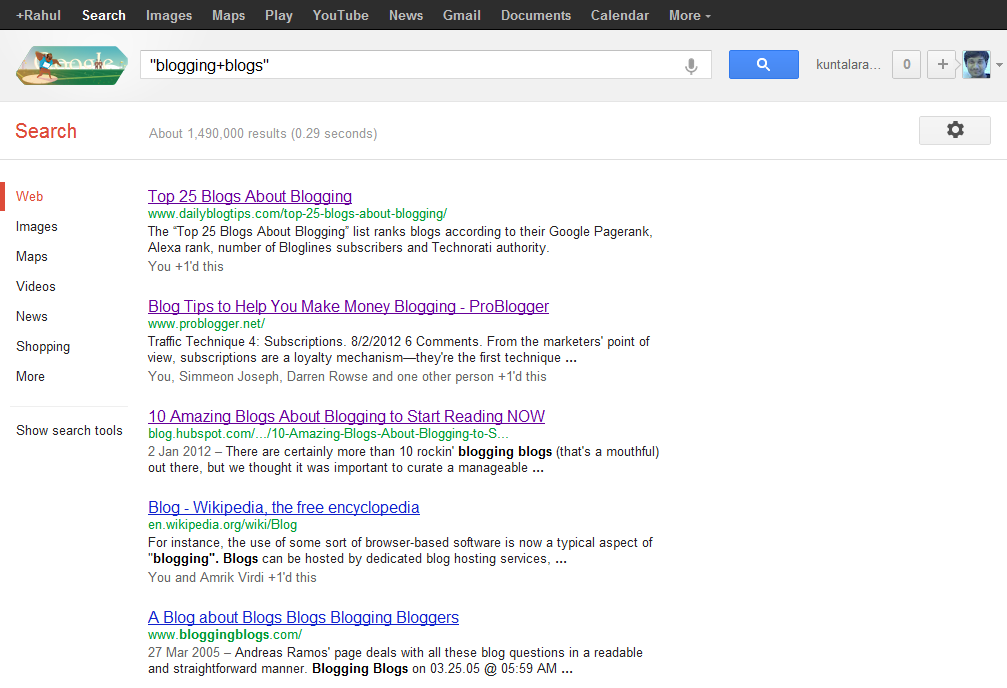
Type “your niche + blog” in google to know which are the top blogs in your niche.How To Get Traffic To A New Blog ?
Ex: “blogging + blog”
Read : Why You should comments on other blogs?

2. Network with others using Facebook and twitter

Facebook: Join in Groups.. Promote yourself out there.. BTW facebook alone is giving me 100+ leads daily (even without promoting everyday!). Ammar Ali is also getting huge traffic from Facebook ;) . So don’t neglect bringing Facebook traffic to your blog.
You may find it difficult in the beginning but when you start promoting others content and when you get to know each other on Facebook, it becomes very easy!
PS: You can join our group ‘Everything About Blogging‘,  and can promote your blog there!
Twitter: Follow top bloggers in your niche and follow their followers. This is the simple yet effective way of increasing your targeted twitter followers. Once you have done this, you can tweet your new articles and ask your followers to retweet it.

3. Video Marketing:

Create a 2 min.video and add your blog link at the starting
Submit them to YouTube, metacafe etc.
Tools to use: Use Screenr to create free videos
Read : Is Video Blogging Worth Trying?

4. Spend time on writing detailed articles.

Never assume that you can bring quality traffic without much efforts.
You need to differentiate yourself with others to become successful. It takes time to create content, I agree but you shouldn’t spend whole time creating only normal or average 600 words posts.
Spend time to create great content.
Write detailed posts with 1000 or 1500+ words once in a while. If you’re not a full time blogger like me, at least try to create detailed posts once or twice a month.
So that you can grab others attention and you can show your blogging expertise to your readers.
It’s really important for you to create killer articles regularly to survive in blogosphere. This can bring your quality traffic from other sites or search engines.

4. Don’t forget SEO

Most people say forget about SEO (Search Engine Optimization) when you’re just starting out.How To Get Traffic To A New Blog ?

I think that’s the dumbest suggestion!

You need to focus on what keywords to use and how much keyword density you should maintain in your content to get search engine traffic to your blog.
It’s extremely important to bring organic (search engine) traffic to your blog. Because it’s free and highly effective!
Make sure that you’re not keyword stuffing your content. It makes your readers hard to digest what you’re saying in your articles.
And do proper keyword analysis before you’re writing the articles. Then embed them into your posts. If you’re a beginner then this is enough! Don’t go beyond, you’ll better understand about SEO when you’re spending more time on blogging.
Don’t Miss : 5 Basic Pillars of Creating Successful and Profitable Blog!

Conclusion:

Always try to retweet and promote your fellow bloggers before asking them to promote your content. This can make others to promote your content sooner or later and you will have high chances of getting their attention if they find it useful. 
I dint recommend guest blogging here in this post. Major reason is without having any online reputation you can’t cope up with other bloggers to get accepted your guest posts. When they reject you, you’ll feel down to submit another guest post to them.
So, focus on building a network by blog commenting, writing great stuff and social media networking using above tips.
Have I missed any other way to  Get Traffic to A New Blog? Take your action by commenting below How To Get Traffic To A New Blog ?

Thursday, 1 August 2013

Top 15 Killer Tips To Increase Page Rank!


Page Rank is a link analysis algorithm which is used by search engines to determine relative importance of your link within their database. Here I’ll tell you how to increase page rank

How is Page Rank Calculated?

Page Rank is calculated by various algorithms made by search engines, in simple words, Page Rank is calculated upon the number of links on your site; these links Include:
  1. Backlinks.
  2. Inbound links.
  3. Internal links.
  4. External links.
  5. No-Follow links.
  6. Do-Follow links.
Google and other Page Ranking sites analyze these links and assign a numerical page rank from 1 to 10 to your website. Below we will discuss Top 15 Killer Tips To Increase Page Rank

How To Increase Page Rank?


Top 15 Killer Tips To Increase Page Rank!
 

1. High Quality Content:

In order to increase Page Rank you must have unique quality content which your readers want to share with their friends. You can read Tips For Writing Engaging Content.

2. Site Submitting:

To boost Page Rank you must have high quality Backlinks and the best way to generate quality backlinks is to submit your site on different web directories and article directories.

Some Good Web And Article Directories Are:

  • DMOZ
  • Yahoo Directory
  • Best Of The Web
  • Ezine Articles
  • Article Base
  • Go Articles

3. Guest Posting:

This is one of the most used and best technique to increase Page Rank. Most Blogs have options of guest posting through which you can post at their blog and get two or three backlinks in return to your blog this really helps if you are posting on good Page Rank Blog with the same Niche as yours.

4. Link Exchange:

This is one of the most old techniques but it still works, in order to get a good PageRank you should get higher Page Rank sites to link to your site, through this you will firstly get a good Page Rank and will get traffic from that site.

5. Keep Updating:

Google really likes Sites that keep their content fresh and unique. The more you post, the more Google will crawl your site and the more chances for you to increase page rank ;)

6. Commenting On Other Blogs:


Top 15 Killer Tips To Increase Page Rank!
Commenting is a very crucial process in generating a good Page Rank. In Blogging Community you must be very socially active. Some Blogs are Do-Follow, which can help you generate back links to your site by just commenting on their posts. Nowadays most blogs have CommentLuv Plugin installed on their site which automatically places a link to their last blog post at the end of their comment.
  • Why You Should Comment on Other Blogs?

7. Social Bookmarking:

Social Bookmarking is a very effective method to increase Page Rank because by sharing your Site on different Social Sites you will get a free Backlink and Traffic. Some of the most popular Social Bookmarking Sites Are:
  • Facebook
  • Google Plus
  • Squidoo
  • Digg
  • Hub Pages
  • Stumble Upon

8. Website Accessibility:

If Your Website is down for a long period of time, Google may reduce the ranking of your site. So You should always keep Your Website accessible.

9. Using Commonly Searched Keywords:

As You know people search using keywords and not the whole sentence so if you have used a keyword which is very frequently searched then you get a higher chance of your website being visited and MORE VISITORS = BETTER PAGE RANK.

10. Website Advertising:

You can make an Ad or a banner for your site and advertise it on different website, through this you will get good back links and traffic.

11. Create Multiple Pages:

If You create multiple Pages on Your Site this will strengthen your internal linking and will ultimately increase Page Rank.

12. Participate In Forums:

Google loves forums that are most frequently updated and by getting a back link from these forums you will succeed on increasing Page Rank.

13. Using Signatures:

You can add a link to your website in your online signatures. For example, you can add signatures in your email and forum posts but don’t try to spam because you can be blocked.

14. When Does Google Re-Evaluate Page Rank?

Google Re-Evaluates Page Rank about Three to Four times per year, so almost every Three months Google calculates Your Page Rank again.

15. Never Use Illegal Tactics:

Using illegal tactics can get you banned from Google and Google is very smart so never think that you can deceive Google because if they find out that you are using illegal techniques which are against their policy they will block you. Stay away from those tactics using these legitimate techniques will improve traffic.


Copyright @ 2013 Blogger Tips & SEO .